Core Feature
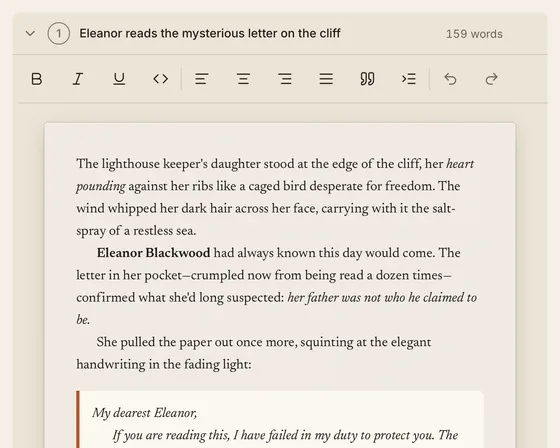
Outline-Aware Drafting
Other apps make you flip between your outline and a blank page.
Scene beats appear as expandable prompts in your drafting view. Click a beat, write into it. Your outline is the scaffolding for your first draft.
Whether you outline every beat or discover your story as you write, kindling gives you a scaffolded writing space — scene beats as expandable prompts, character details at your fingertips, and the flexibility to add structure at your own pace. When the draft is ready for another reader, exchange comments and tracked suggestions through local review files.
Download kindling — Free Core Feature
Other apps make you flip between your outline and a blank page.
Scene beats appear as expandable prompts in your drafting view. Click a beat, write into it. Your outline is the scaffolding for your first draft.
Stay in Flow
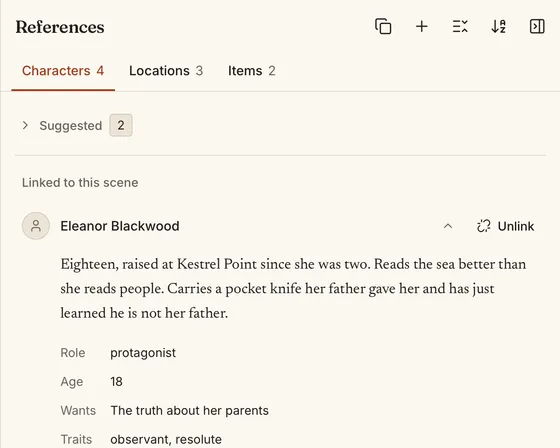
Was it green eyes or blue? What was the tavern called?
Characters and locations tagged in your scene auto-surface in a side panel. Physical descriptions, key notes, and custom fields — all visible while you write.
Your Tools
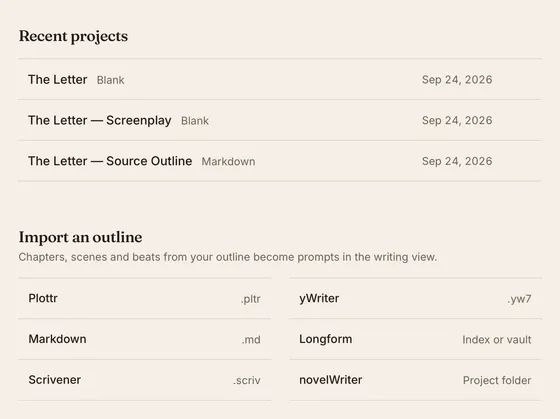
Your outline lives in one app, your manuscript in another.
Import from Plottr, Scrivener, yWriter, Obsidian Longform, novelWriter, or Markdown. Choose a simple export or save a Custom profile with manuscript previews and layout controls. Custom also adds HTML and plain-text manuscript output. See our Scrivener alternative guide and import instructions before moving an existing project.
Your Pace
Not every scene needs the same level of planning.
Three planning states — Fixed, Flexible, Undefined — let you add structure progressively. Start vague, define as you go. The sidebar adapts automatically.
Full Control
Your outline needs to evolve as you write.
Delete, reorder, split, and merge beats with drag-and-drop. A beat density indicator shows how detailed each scene is at a glance.
Capture Ideas
Inspiration doesn't wait for your outline.
Press Cmd/Ctrl+D to jot a note mid-scene — a subplot idea, a character insight, a thread to weave in later. Promote notes to full beats when you're ready.
02 / This release
A new editorial design, and tools for your next draft, writing session, and round of feedback.
kindling’s new design brings warm paper surfaces, bookish typography, and quiet controls to the app and website. Your prose has room to breathe, with fine rules to separate the tools around it. The app’s light and dark themes share the same care for reading.
Take a first look at Press →
Send your whole manuscript or selected chapters as a .kindling-review file. Your editor reads and
edits in kindling, with tracked suggestions, threaded
comments, and simple or full markup. Import their feedback
and accept or reject changes beside your manuscript. Keep
writing while the review is out; if a passage has changed,
compare it before applying the suggestion.
Prepare a submission, a reading copy, or chapters for your website. Save profiles with chapter selections, typography, and book details, and check the manuscript preview before exporting. Start with Agent submission, Writing group, or Website chapters. The simple format choices remain available whenever you just need a file.
Explore the export workspace →Set a daily goal for each book and follow your writing streak. Scene, chapter, project, and session totals stay visible in the status bar. Open Writing statistics for chapter counts and a breakdown of scenes with prose. Daily totals count net words added through saved edits, so cutting words can lower the number.
Understand your progress →Previously shows the preceding scene’s title, synopsis, and closing three sentences, even across chapter boundaries. kindling also restores your last scene, expanded beat, cursor, and scroll position when you reopen a project.
Pick up where you left off →Search the current scene or the whole project, match case or whole words, and jump directly to a passage. Replace one match or all editable matches, with Undo replacement while the dialog stays open. Locked scenes and chapters are protected from replacement.
See search scope and shortcuts →Copy characters, locations, and other references into another project, including their notes, custom fields, and tags. Review possible duplicates before copying. Existing references are never overwritten, and the copies evolve independently with each book.
Bring your story world along →Bring in a novelWriter project folder with chapters, scenes, prose, beat comments, and reference notes. Export for novelWriter 26.2 or newer. For a linked project, Sync lets you compare incoming prose and select the replacements you want; no prose changes are selected by default.
Follow the novelWriter workflow →Appearance, shortcuts, author details, project preferences, reference types, tags, and custom fields now share one window. Choose another project inside Settings without moving away from the manuscript you have open.
Explore Settings →Remap commands and prose formatting, clear a binding, or restore the defaults. Changes apply across projects and launches, with menus and shortcut hints updating immediately. Conflicts name the command already using your chosen keys.
Customize your shortcuts →03 / Drafting tools
Write Your Way
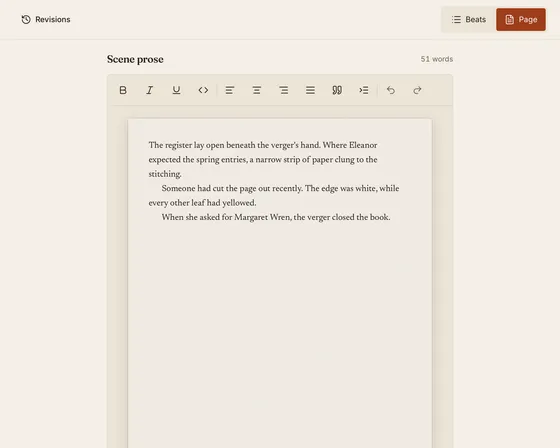
Beat-by-beat is great for structure. But sometimes you just want to write.
Toggle between beat view and a full-page prose editor per scene. Your beats stay available for reference — you get an uninterrupted writing surface without leaving your structure behind.
Screenwriters
Novel tools don't speak the language of screenwriting.
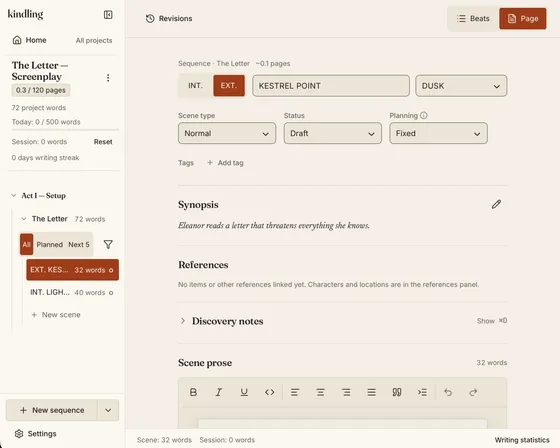
Create Screenplay projects with slugline input (INT./EXT.), page count estimation (250 words/page), and treatment export (1-page or 5-page DOCX). Pre-built templates: Save the Cat, Hero's Journey, Three-Act, Seven-Point, Snowflake, Story Grid.
Smart Context
You mentioned a character three paragraphs ago but forgot to link them.
A non-AI engine scans your prose for character, location, and item names. Suggestions surface in the References panel — link with one click, or dismiss. No cloud, no magic, just pattern matching.
Flexible Data
Plain text notes don't cut it for complex characters and worlds.
Define typed fields (text, number, date, select, multi-select) on any reference type. Organise with hierarchical tags up to three levels deep, with colours and a Tag Manager. Use saved filters to find exactly what you need.
04 / Specifications
Free, open source, MIT licensed. See how kindling compares to Scrivener, Plottr, and other writing tools.