Story outlining software that doesn't stop at the outline
Most outlining tools help you plan a story. Then they hand you a blank page and wish you luck. kindling keeps your outline visible while you write — so every scene starts with structure, not silence.
02 / The gap
The outline-to-draft gap
For a worked approach, read how to turn your outline into a first draft. If you are still choosing a tool, compare story outlining software and Plottr alternatives.
You've spent weeks building a beat sheet. You know your characters, your turning points, your act structure. The outline is finished. Time to write.
You open your writing app. Blank page. Blinking cursor. Your outline is in another window, another tab, another app entirely. You start flipping back and forth — outline, manuscript, outline, manuscript — and the flow you're trying to build keeps breaking.
This is the gap most story outlining software ignores. Planning tools are great at helping you plan. But when it's time to write, you're on your own.
kindling closes that gap. It puts your scene beats directly in your drafting space, so your outline becomes writing prompts instead of a reference document you never look at again.
03 / The difference
What makes kindling different from other outlining tools
Your outline lives inside your drafting view
When you open a scene in kindling, your beats are already there — collapsible cards you can expand and write into. You're never staring at a blank page wondering what comes next. Click a beat, write the prose, collapse it, move on. Your outline isn't a separate document — it's the scaffolding for your first draft.
Rolling Outline: structure at your own pace
Not every scene needs the same level of planning. kindling's Rolling Outline system gives each scene one of three states:
- Fixed — Full beat scaffolding, references, and discovery notes. For scenes you've fully planned.
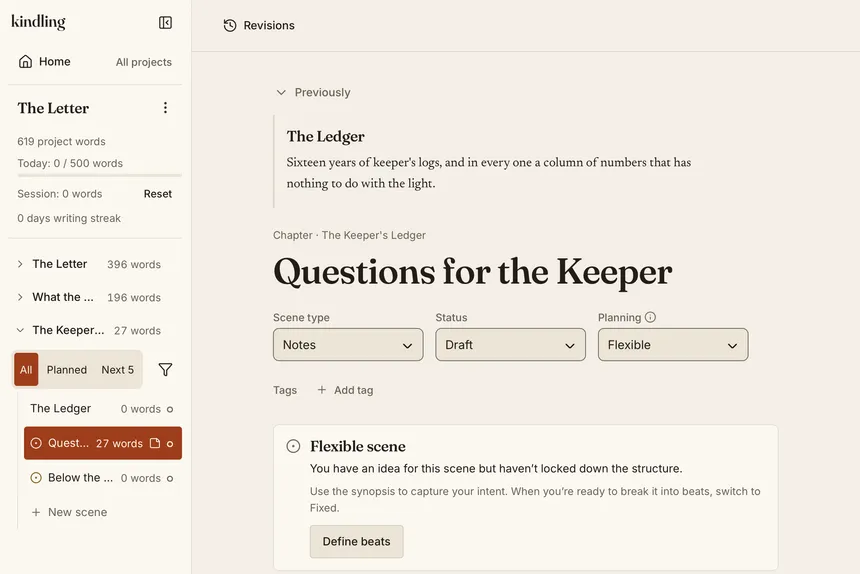
- Flexible — Title and synopsis only. Beats are hidden until you're ready to expand.
- Undefined — A placeholder. You know this scene exists, but you haven't figured it out yet.
Promote scenes progressively as your story takes shape. This is how plantsers actually work — you don't plan everything upfront, and your tools shouldn't force you to.
Characters and locations surface automatically
The References panel shows characters, locations, and items linked to each scene. When you open a scene, the context you need is right there — no tab switching, no searching through a research folder. Smart detection can even scan your prose and suggest references you've mentioned but haven't linked yet.
Import from the tools you already use
You don't have to start from scratch. kindling imports outlines from:
- Plottr (.pltr) — Timelines, beats, characters, and locations
- Scrivener 3 (.scriv) — Binder hierarchy, synopses, and prose
- yWriter (.yw7) — Chapters, scenes, goal/conflict/outcome beats, and references
- Obsidian Longform — Scene files, frontmatter metadata, and wikilinked references
- Markdown (.md) — Simple heading-based outlines (H1 = chapter, H2 = scene)
Your structure, characters, and notes come with you. No retyping, no copy-paste.
04 / At a glance
Outlining features compared
How does kindling's outlining stack up against dedicated planning tools?
| Feature | kindling | Plottr | Scrivener | Dabble |
|---|---|---|---|---|
| Outline visible while drafting | ✓ | ✗ (no drafting) | Synopsis / split editor | Plot Grid beside the editor |
| Scene beats as writing prompts | ✓ | ✗ | ✗ | ✗ |
| Progressive structure (Rolling Outline) | ✓ | ✗ | ✗ | ✗ |
| Character/location refs in drafting view | ✓ | ✗ | Partial | ✗ |
| Beat management (split, merge, reorder) | ✓ | ✓ | ✗ | ✗ |
| Visual timeline | ✗ | ✓ | ✗ | ✗ |
| Beat sheet templates | ✓ | ✓ | ✗ | ✗ |
| Import from other tools | ✓ (5 formats) | ✗ | ✗ | ✗ |
| Export to DOCX / EPUB / Scrivener | ✓ | DOCX only | ✓ | DOCX only |
| Free / open source | ✓ | $60/year or $150 lifetime (desktop) | $59.99 per desktop platform | $19–49/month; $699 lifetime Author |
| Works offline | ✓ | ✓ | ✓ | ✗ |
| AI-free | ✓ | ✓ | ✓ | ✓ |
05 / Who it’s for
Who is kindling for?
- Plotters who build detailed outlines but stall when it's time to write prose. kindling turns your beat sheet into a drafting environment where structure is always visible.
- Plantsers who want some structure but not a rigid outline. Rolling Outline mode lets you start with vague placeholders and define scenes as you go.
- NaNoWriMo participants who need to move fast from plan to draft. Import your existing outline, and your beats become instant writing prompts.
- Series authors tracking characters, locations, and plot threads across multiple books. References and custom fields keep your series bible next to your drafting space.
- Screenwriters outlining feature films or pilots. kindling's screenplay project type adds sluglines, page count estimation, and treatment generation.
06 / Bring your outline
Works with your existing outline
Already have an outline somewhere? kindling imports from five formats, preserving your structure, characters, and notes:
- Plottr — Scene cards, character arcs, timelines, and custom attributes
- Scrivener 3 — Binder hierarchy, synopses, and draft content
- yWriter — Full project structure including goal/conflict/outcome beats
- Obsidian Longform — Scene files with frontmatter metadata and wikilinks
- Markdown — Any heading-based outline (H1 chapters, H2 scenes, list-item beats)
When you're done drafting, export to DOCX (Standard Manuscript Format), Scrivener, Markdown, Obsidian Longform, or EPUB. See the full import and export documentation.
07 / Questions
Frequently asked questions
What is story outlining software?
Story outlining software helps fiction writers plan the structure of a novel, screenplay, or series before (or while) they write. It typically lets you organize chapters, scenes, and beats, track characters and locations, and see the shape of your story at a glance.
Can I use kindling if I'm a pantser?
Yes. kindling's Rolling Outline mode lets you start with almost no structure. Create blank chapters, mark scenes as "Undefined," and fill in detail as you discover your story. You can also create a completely blank project with File → New Project and build your outline as you go.
Does kindling replace Plottr or Scrivener?
Not necessarily. Many writers use kindling alongside their existing tools. Plan in Plottr, draft in kindling, revise in Scrivener. kindling imports from both and exports to Scrivener, so they work well together. See our detailed comparison.
Is kindling really free?
Yes. kindling is MIT-licensed open source software. No accounts, no subscriptions, no feature gates, no data collection. It's free forever. Learn more about the open source model.
Your outline deserves better than a blank page
Free, open source, works offline. macOS, Windows, and Linux.